 iOS
iOS Android
 Windows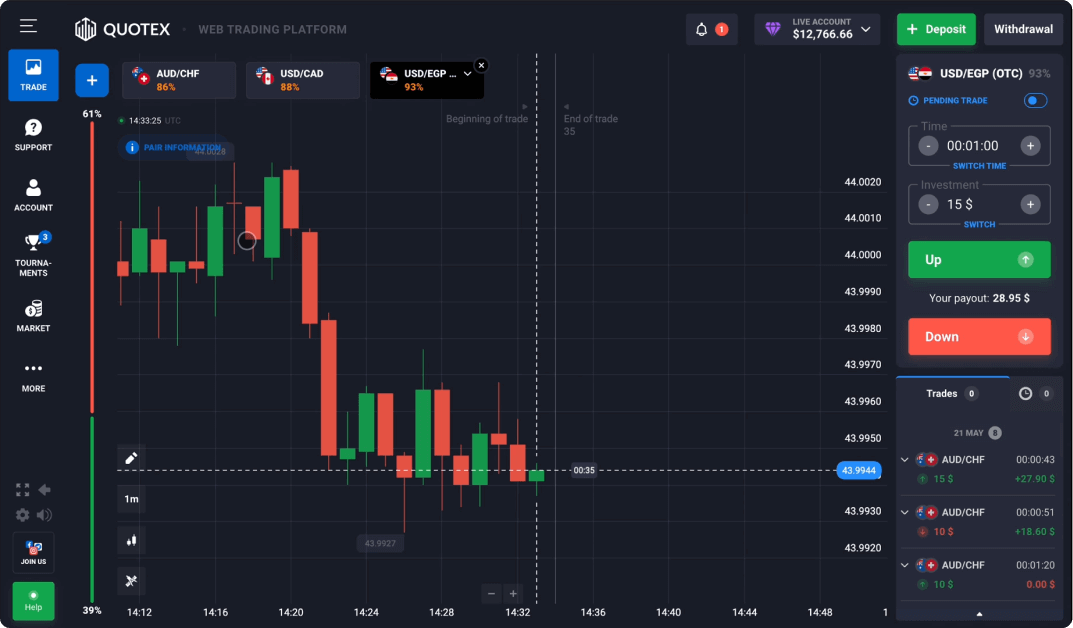
Start with two different questions
When researching a platform, ask what the software does and what product it provides access to. Those questions are related, but they are not interchangeable. A clear interface can make a high-risk product easier to access without making it easier to understand.
Quotex is associated with fixed-outcome digital options. This overview introduces the vocabulary used around the interface; it is not a recommendation to use the product.
The parts of a platform interface
A typical financial interface combines a market selector, chart area, timing controls and activity history. Account information may be shown in a separate panel. The location and naming of controls can change with software updates.
Read the labels before interpreting the colours. A chart interval describes the period represented by the chart, while contract timing concerns settlement. A market label may identify a reference price rather than an asset you own.
Read the documentation beside the screen
The interface is not the full contract. Written terms should explain pricing sources, settlement, what happens during interruptions and the process for questions or disputes. If an important term is unclear, an attractive screen does not resolve that uncertainty.
The platform guide organises these topics into features, accounts, conditions and risks. It intentionally avoids figures that would become stale without repeated checks.
A useful research order
Start with the risk disclosure and current regional rules. Then read the platform explanation, mobile access guide and demo limitations. This order helps you evaluate a feature without confusing convenience with suitability.
- Identify the product and its settlement structure.
- Check current local restrictions and the provider’s legal information.
- Separate public product descriptions from independent verification.
- Use a demo only as a simulation, not evidence of future outcomes.
Common questions
Does an asset label mean I own that asset?
Not necessarily. The product terms determine the exposure or rights involved. A market name in an interface is not proof of ownership.